Saturday, 30 March 2019

DOWNLOAD GameMaker 8.1.141 Standard (Portable, by PHL).
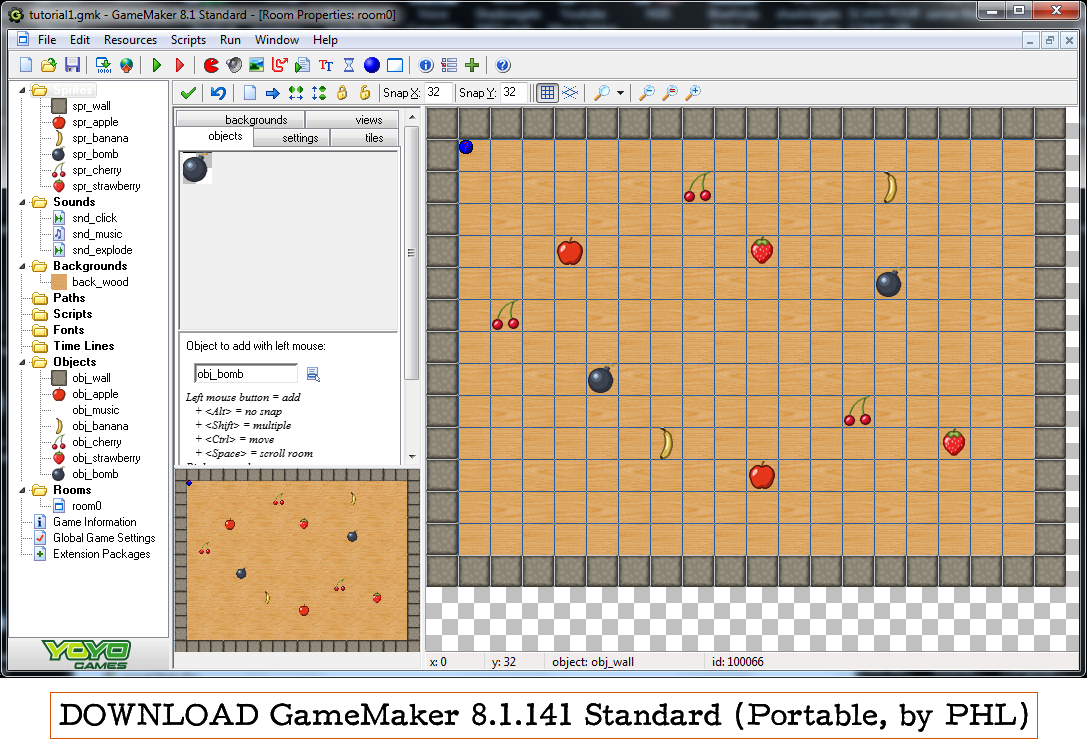

GameMaker 8.1.141 Standard (Portable, by PHL).


----------------------------------------------------------------------------------------
It is portable (you do not need to install it).
To start it, choose “Game_Maker.exe” .
If that does not work, there are three other ways to start it:
1) Use “START GameMaker 8.1.141.exe”
or
2) First open "GameMaker.exe" (the updater) if it is not open. It appears as a blue dot in the taskbar. And then open "Game_Maker.exe" (game creation program)
or
3) Use “Game Maker 8.1.141.bat”.
----------------------------------------------------------------------------------------
THINGS I ADDED:
- START GameMaker 8.1.141.exe (and START GameMaker 8.1.141.png).
- Extension Maker and Library Maker for Game Maker 7 and later.
- Game Maker Tutorials.
- Windows XP Sound Recorder : sndrec32.exe . It can reduce the size of a WAV file to that of an MP3 file without changing the WAV into MP3. This is important because GameMaker 8.1 has the most features (such as sound effects and playing multiple sounds) when using WAV files. But WAV files are usually large. And MP3 files are limited (only one sound plays at a time) when used in GameMaker8.1.  So you need the benefits of WAV files in GameMaker while also enjoying the benefits of MP3’s small filesize. Solution: make an MPEG Layer-3 WAV file.
To make MPEG Layer-3 WAV files, load the WAV file into Windows XP Sound recorder (you can drag the file to it). Go to “File”, and choose “Properties”. Choose “Convert Now”. Go to “Format” and choose “MPEG Layer-3” (it may appear near bottom of list. If “MPEG Layer-3” does not appear, you may need to install an MP3 codec in your Windows computer).  Choose your attributes (smaller values cause smaller filesizes), and choose OK. Now you can see that the information says “Audio Format: MPEG Layer-3” along with your attributes. Choose OK. Go to “File” and choose “Save As” and  save the WAV file, which can be taken into GameMaker 8.1 as a “Normal Sound”.  (MP3 files could not be accepted as “Normal Sounds”.)
----------------------------------------------------------------------------------------
DOWNLOAD GameMaker 8.1.141 Standard (Portable, by PHL):

----------------------------------------------------------------------------------------

Friday, 22 March 2019

A Funny License Agreement (Junior Icon Editor).


A Funny License Agreement (Junior Icon Editor).


This thing is so funny that it belongs in a book of jokes.
It is from the makers of a program called Junior Icon Editor.
“Please read it carefully.”

Here it is:


If you do not agree, you are not allowed to install.

_______________________________________________________
_______________________________________________________
_______________________________________________________


Since this is about a program for making icons for files, I will mention Greenfish Icon Editor Pro 32-bit, which I use most often.

What is a program for making icons for files?

It makes icons (pictures) for a file. The icons can be of different sizes, for example: 24x24 pixels, 32x32 pixels, and or 64x64 pixels.

If you are a software maker, for example if you make video games, you can make the icon for your app or executable by using a program for making icons for files.

Extension Maker and Library Maker for Game Maker 7 and later.

Extension Maker and Library Maker for Game Maker 7 and later.

_____________________________________________________________

Extension Maker

Version 1.2
Written by Mark Overmars

Introduction

Game Maker has a large number of features but there is always a need for more. Since version 7.0 it is possible to add extension packages to Game Maker. Extension packages extend the functionality of the GML language by adding additional action libraries, functions and/or constants. They can be created relatively easy by people that have a bit of programming experience.
_____________________________________________________________________

Library Maker

Version 1.3
Written by Mark Overmars

Introduction

The collections of actions that you find in the object properties form and that can be used in events are stored in libraries. There are a number of default libraries but you can also create your own libraries. Such libraries can then be turned into extension packages using the Extension Maker. The Extension Maker generated package files which can then be installed and used in Game Maker. For details see the help file of the Extension Maker.
_____________________________________________________________________

Download Extension Maker and Library Maker for Game Maker 7 and later.


http://download1590.mediafire.com/s671riywyxcg/rumpv3h7uxdsaxi/Extension+Maker+and+Library+Maker+for+Game+Maker+7+and+later.zip

Saturday, 9 March 2019

Friday, 8 February 2019

“No SIM card”. Is your Android phone saying this?


“No SIM card”. Is your Android phone saying this?

8th February 2019, Friday.
Sable, Douala, Cameroon.
__________________________________________________

Greetings today.
__________________________________________________

THE PROBLEM.

Last week I was downloading a book on my Android phone (MTN-S620) using the app ADM which can resume stopped downloads.
I took my eyes from the phone to relax and do some self-hypnosis using my mixture of self-made Alpha 7.5hz binaural beats and isochronic tones.
After the ten- or fifteen-minute session I opened my eyes and saw that my phone had apparently rebooted on its own. The phone took a long time “optimizing apps” before the main screen showed. I also felt the phone being painfully hot when I held it in my right hand.
After the booting I saw that my Internet no longer worked. I checked my SIM cards in the drag-down panel and saw the message “No SIM card”.
I stayed calm. I thanked God that at least the phone still worked. I could still listen to music on it, and read books on it using WPS Office, my favourite ebook reader for Android.
I removed the SIM cards, put them back in, and rebooted phone, and the message remained. I assumed the SIM card reader was bad, physically (in hardware).
The next day I went to a cybercafé where you buy a ticket allowing you to use the Internet for an amount of time, on one of the computers there.
In Google.com I typed “android phone cannot detect sim cards”, and found web pages that offered solutions to the “no sim card” problem.
__________________________________________________

MY SOLUTION.

I will share the pages with you after telling you how I solved my problem. I tried to solve it by turning on airplane mode and then turning it off, but that did not work.
I was eager to know if the problem was with my hardware or software and did not want to waste time, so I decided to do a factory reset of my phone quickly. I copied my important files to a computer and did factory reset on the phone. After that I had to re-install apps and copy my files back to the phone, but now the SIM cards were showing. So it was a software problem.

WARNING: Be careful when doing factory reset because you will lose this:
- All installed apps
- Everything in the phone storage, like your phone CONTACTS, downloaded files, music, internet configuration (for Orange Cameroon in my case), and videos.
ACTION: Remove your SIM cards, your memory cards, and any external devices from your phone to avoid them being erased when you do Factory Reset.
You can use an app like Apk Extractor to convert your installed apps into APK files (Android installation files), then you copy the apks elsewhere, and after resetting your phone you can install those apks back into your phone.

__________________________________________________

THE WEBPAGES THAT I FOUND.

I am sorry; I downloaded these webpages and now I do not know how to get their individual web addresses , although I can get the addresses of their source websites. I will give you their titles and you can copy a title and paste it in the search bar of Google.com and search for the related web page. Thank you.

Here are the web pages that I found (remember, search for the title in Google):

1. [Solved] How to Fix Error "No SIM Card Detected" on Android


2. How to Fix No SIM Card Detected Error on Android


3. How to Fix No SIM Card Detected on Android


4. How To Fix No SIM Card Error On Android


5. How to Fix No SIM Card Installed Error On Android Phone


6. How to Fix 'SIM Card Not Detected' in Any Phone


7. How to Solve the No SIM Card Error on Your Android Phone


8. How to Fix 'Phone Can't Detect SIM Card' Issue


9. No SIM card Inserted on Android How to Fix


10. Why SIM Card Cannot Be Detected in my Phone, How to Fix?

__________________________________________________

REMINDER:
You can use Apk Extractor to convert your installed apps into APK files (Android installation files). This is useful if you do not have the setup (installation) file APK.

__________________________________________________

Written by Tamajong Tamajong Philip (PHL)